The project seemed clear: an outdoor display for a neighborhood, showing dynamic QR codes. A screen, a controller, connectivity, some weatherproofing. A few weeks of work.
Then the decisions started stacking up. Matte or glossy finish? Sunlight readability matters a lot outdoors, and glossy panels wash out badly. Touchscreen or remote buttons? On a public outdoor installation, touchscreens collect grime and get damaged. OLED or e-paper? That choice alone had implications well beyond display technology.
That project was a good reminder that “we need a screen” is rarely the end of a decision process. It is usually the beginning.
Three ways to integrate a display
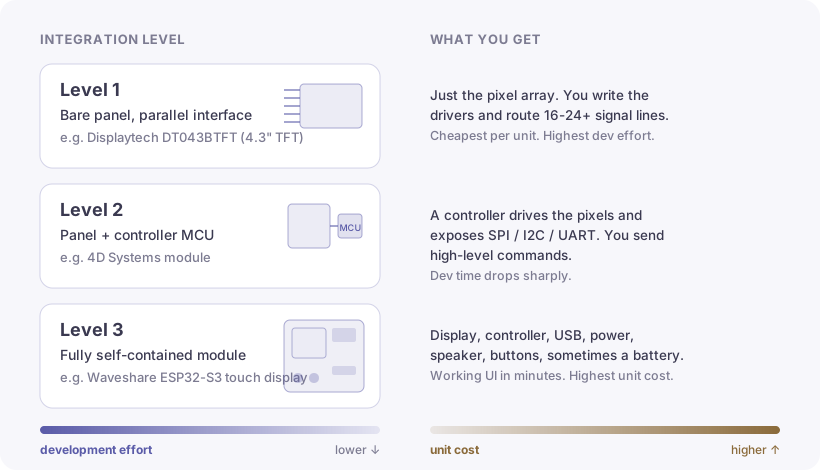
When you decide your product needs a display, you are actually making several nested decisions. Most people jump straight to “which panel should I order” without realizing there are three very different integration levels, each with a distinct development cost.
Level 1 is a raw display panel with a parallel interface: a flat flexible cable with 16, 24, or more signal lines driving the pixel array directly. The Displaytech DT043BTFT is a typical example, a 4.3-inch TFT with no intelligence on board. Cheap per unit, capable of high performance, but you are writing display drivers from scratch and routing a lot of traces on your PCB. The development overhead is real.
Level 2 adds a controller MCU between the panel and your main processor. The controller handles the low-level pixel driving and exposes a much simpler SPI, I2C, or UART interface to your board. 4D Systems modules fall in this category. Your firmware sends high-level commands (draw text at these coordinates, render this bitmap) instead of managing every display cycle yourself. More expensive per unit, but the development time drops significantly.
Level 3 is a fully self-contained module: display, controller, USB, power management, speaker, physical buttons, sometimes a battery, all integrated. Waveshare’s ESP32-S3 touch displays are a good example. You connect one and have a working UI in minutes. You pay in unit cost and in reduced control over the final form factor.
Technology: TFT, OLED, e-paper
Beyond integration level, the display technology itself shapes what your product can do.
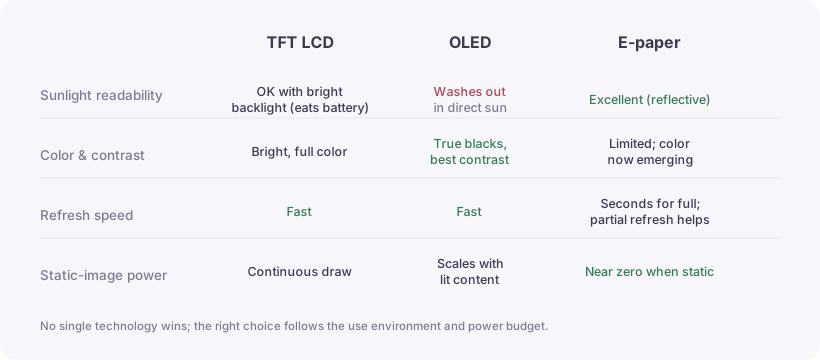
TFT LCD panels are the workhorse: reasonable cost, bright color, fast refresh. They work well indoors but struggle in direct sunlight unless you invest in high-brightness backlighting, which eats battery.
OLED offers excellent contrast and thin form factors. Each pixel is its own light source, so blacks are truly black and power consumption scales with screen content. The downsides: OLED washes out in bright sunlight and suffers burn-in on static content over time.
E-paper is the interesting one for the right applications. The display only consumes power when the image changes; a static image requires almost no energy to hold. Everyone knows the limitation: refresh rates measured in seconds for a full update. What is less well known is that most modern e-paper controllers now support partial refresh, updating only a region of the screen with substantially less flicker and better perceived responsiveness. (I believe this is accurate for current hardware, but check the specific panel datasheet before counting on it in your design.) Color e-paper has also become accessible, opening up applications in retail shelf labels, smart signage, and low-power status displays where you want color without the battery cost.
On the outdoor QR code installation, we landed on e-paper with a matte panel and remote buttons. No touchscreen on a public outdoor install. Too much maintenance. No OLED either: the sun would have made it unreadable.
How to start
Start at Level 3. Buy a Waveshare module or equivalent, connect it, and build your UI in an afternoon. This is prototyping. The goal is to validate that the UX actually works before committing to a form factor.
Once you know the interface makes sense, the user understands what the device is doing, and the display technology holds up in real conditions, then you decide if dropping to Level 2 or Level 1 is worth the engineering time. That decision usually comes down to unit cost at volume and form factor constraints. At 10,000 units, the per-unit savings of moving from a full module to a bare panel with a controller add up quickly. At 50 units, the engineering cost almost always exceeds the savings.
The question worth asking first
There are screens everywhere. Most of the time when someone says “the product needs a display,” it is because they are used to seeing displays in other products, not because a display is the best solution for their specific interaction.
I regularly suggest to clients that we run a short UI/UX session before committing to any display technology, or before committing to a display at all. Sound, vibration, light, mechanical indicators: each can replace a screen in the right context. On portable products especially, haptic feedback is chronically underestimated. The human body is remarkably good at interpreting subtle mechanical signals without consciously thinking about them, and a well-designed haptic response can communicate state changes faster and more intuitively than a visual indicator often does.
The products with the strongest adoption are often the ones that solve a problem so well that the user stops thinking about the interface entirely. A smoke detector that works is invisible. A thermostat you never touch after the initial setup is a good thermostat. In those cases, a screen is not just unnecessary: it is friction. That is worth thinking about before the PCB layout is done.